
Rebuilding my brain.
Switching to Obsidian from Notion
Published Nov 17, 2025 · Around 2 minutes to read
I'm switching to Obsidian from Notion. I've been building my second brain in Notion since 2021. It's a living document which has my notes, ideas, book summaries, resources and more. I use it every day to track things that are happening at work and life.
And it's been great. I can attribute my clarity and success to this digital garden.
But lately, my Notion has been getting cluttered and overgrown. There are notes I haven't visited in years. My daily journaling practice has fallen off. And it's getting harder to find things.
So I decided to change it up by moving to Obsidian. It's a simpler tech setup (it's just a bunch of markdown files). And it works offline.
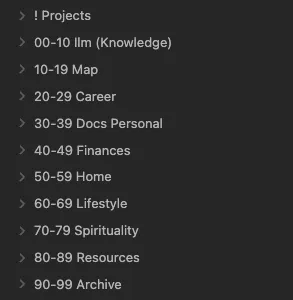
But I didn't want to simply import all of my notes from Notion to Obsidian. I tried that and it was a mess. I want to be deliberate about what I port over. First, I defined the structure of my second brain. It's a combination of PARA and Johnny Decimal. I've been using this structure in my Google Drive and it's worked great. I can find things fast without relying on Drive's subpar search.
Eventually, I plan to run Agentic RAG over my notes. Claude Code worked brilliantly in my experiments. But I might switch to LangChain's Deep Agent since I'm headed down the self-hosted path for my software.
The goal is to make my second brain super accessible. And to make sure that this exercise isn't productivity in disguise, I'm only porting over notes from Notion when I need to.
Just in time knowledge > Just in case knowledge.
What digital organization system works for you?
--
P.S. Here's the structure for my second brain. It covers every possible facet of my life. It's an expanded PARA. Projects up top. Areas are 00-79 in Johnny Decimal format. And then back to Resources and Archives again from PARA.
P.P.S. I'm using SyncThing to sync my Obsidian notes across my computers, Android, and NAS.
READ NEXT